Stop Struggling with Sudoku: Master Candidate Mode Now

If you have ever stared at a hard sudoku puzzle and felt completely stuck, candidate mode is probably the tool you are missing. It transforms the way you see the grid — turning an overwhelming collection of empty cells into a structured map of possibilities. This guide explains exactly what candidate mode is, when to use it, and how to use it effectively.
What Is Candidate Mode?
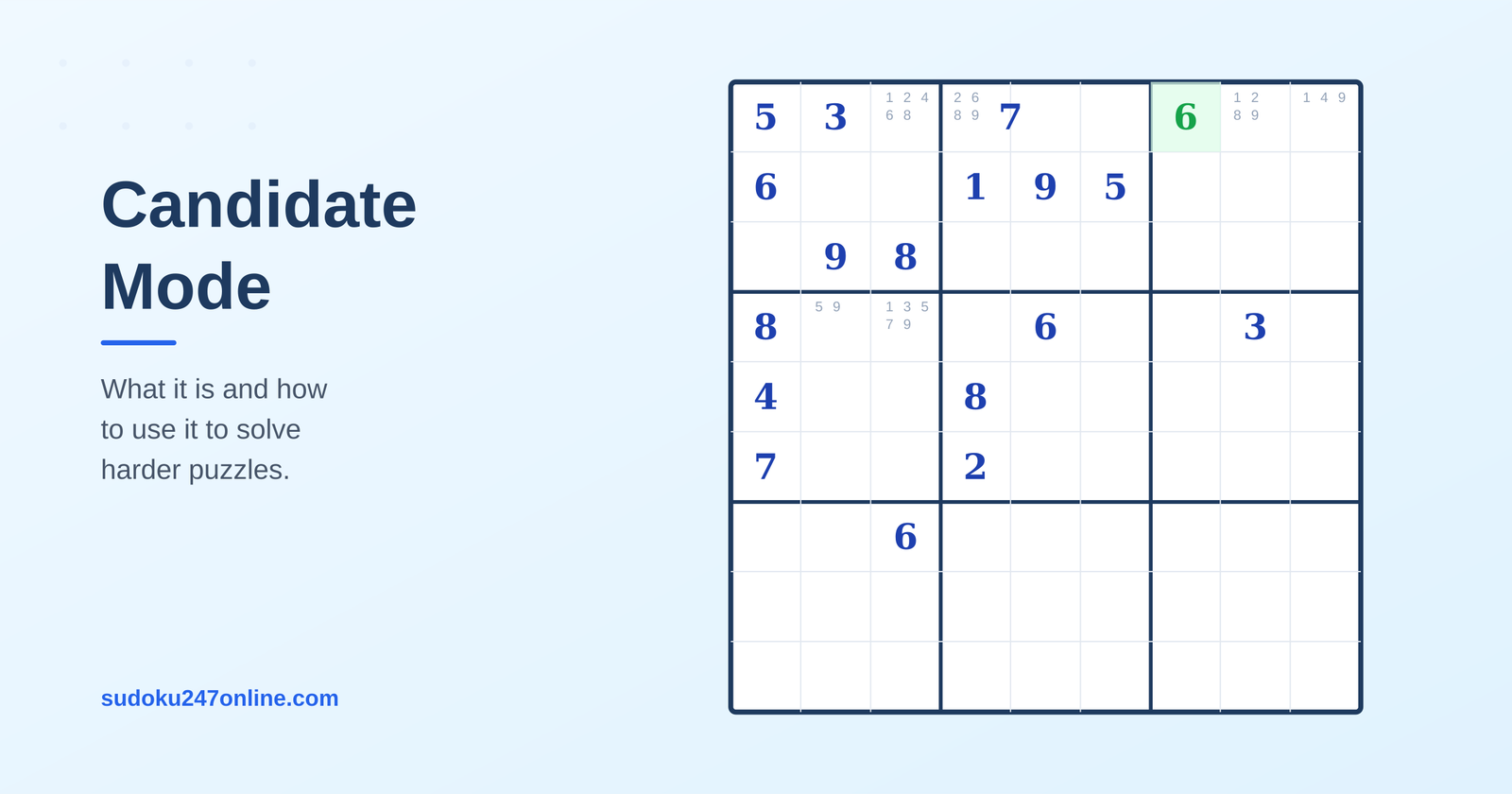
Candidate mode — also called notes mode or pencil marks — is a technique where you write small numbers inside each empty cell to record which numbers are still possible for that cell based on what has already been placed in its row, column, and box.
For example, if a cell is in a row that already contains 1, 3, 5, 7, and 9, and in a column that contains 2 and 6, and in a box that contains 4 and 8, then the only number that can go in that cell is… actually nothing — it is already solved by elimination. But if the column contained 6 instead of 2, the candidates for that cell would be 2 and 4.
In candidate mode you write those small numbers — 2 and 4 — inside the cell to remind yourself what is possible. As you make more placements and eliminate more possibilities, you cross out candidates or remove them, narrowing each cell down until only one remains.
Why Candidate Mode Matters
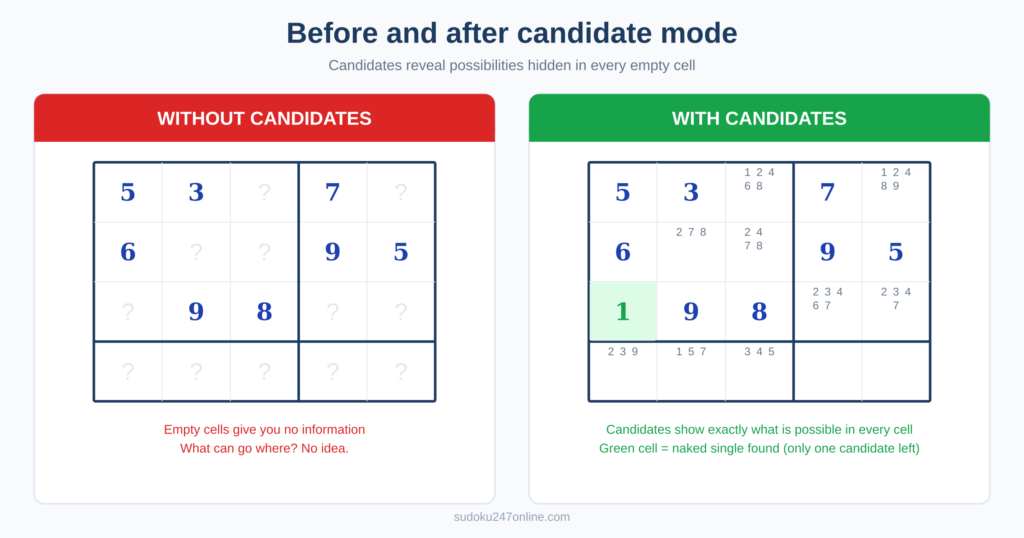
Easy sudoku puzzles can usually be solved by scanning the grid for obvious placements. Medium puzzles require more careful attention. Hard and expert puzzles almost always require candidate tracking.
Without candidates, you are trying to hold all the possibilities for every cell in your head simultaneously. This is possible for simple puzzles but becomes increasingly unreliable as the puzzle gets harder. A single missed possibility can lead you to an incorrect placement that takes many moves to unravel.
With candidates written down, the grid becomes a complete picture of everything you know. You can see patterns that would be invisible otherwise — pairs of cells that share the same two candidates, numbers that only appear in one cell within a row, and complex patterns like X-Wing that require scanning multiple rows and columns at once.
How to Use Candidate Mode Step by Step
Step 1: Fill in all candidates at the start
At the beginning of a hard puzzle, go through every empty cell and write in all the numbers that are still possible based on what is already placed. A cell might have six or seven candidates at the start — that is normal.
Work systematically. For each empty cell, look at its row, column, and 3×3 box. Any number already present in any of those three units cannot be a candidate. Write in everything that remains.
This initial fill-in takes a few minutes but it is worth every second. It gives you a complete map of the puzzle’s current state.
Step 2: Update candidates as you make placements
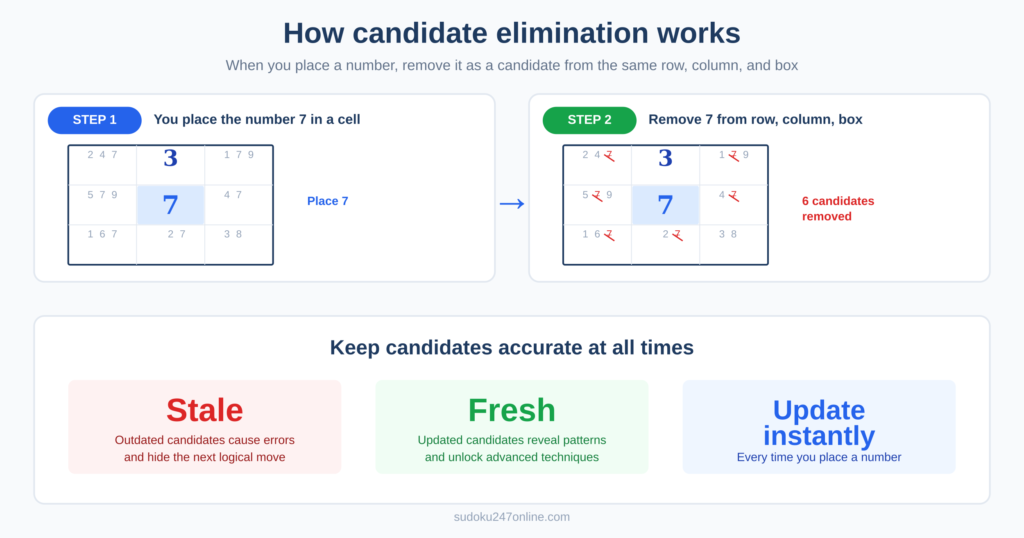
Every time you place a number in a cell, immediately remove that number as a candidate from every other empty cell in the same row, column, and box. This is non-negotiable. Stale candidates — ones that are no longer valid but have not been removed — are the most common cause of errors and confusion.
If placing a number removes candidates from other cells and leaves one of those cells with only a single candidate remaining, fill in that cell too and continue the cascade.
Step 3: Use candidates to apply techniques
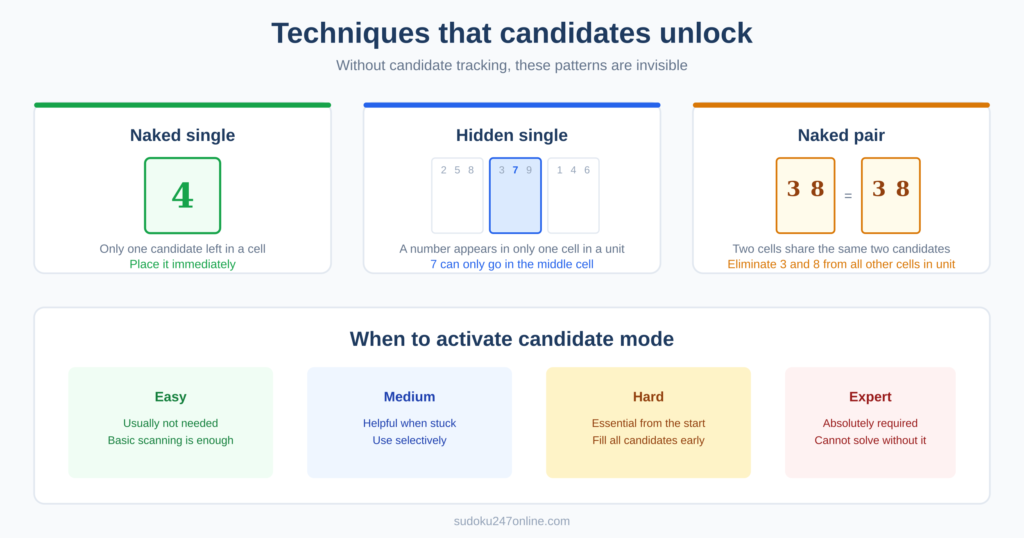
With accurate candidates in place, you can apply solving techniques that would otherwise be invisible. Look for:
Naked singles — a cell with only one candidate remaining. Fill it in.
Hidden singles — a number that appears as a candidate in only one cell within a row, column, or box. Place it there.
Naked pairs — two cells in the same unit with exactly the same two candidates. Eliminate those two numbers from all other cells in the unit.
Hidden pairs — two numbers that only appear as candidates in the same two cells within a unit. Eliminate all other candidates from those two cells.
X-Wing — a candidate that appears in exactly two cells in each of two rows, aligned in the same two columns. Eliminate that candidate from all other cells in those columns.
None of these techniques are reliably visible without candidate tracking.
Candidate Mode in Online Sudoku
Most online sudoku games including the puzzles on this site have a built-in notes or candidate mode. Look for a pencil icon or a “Notes” button in the game controls. When notes mode is active, numbers you enter appear as small candidates rather than as confirmed placements.
Toggle between normal mode (placing confirmed numbers) and notes mode (adding candidates) as needed. Some players prefer to fill all candidates first then switch to normal mode. Others toggle back and forth throughout the solve.
On this site the Notes button is visible in the game toolbar. Tap it to activate, tap again to deactivate. Candidates show as small numbers in the corner of each cell and are automatically removed when a confirmed number is placed in the same row, column, or box.
Is Using Candidate Mode Cheating?

No. Candidate mode is equivalent to writing pencil marks in the margin of a paper puzzle — a technique used by virtually every serious sudoku solver and explicitly recommended in puzzle books and guides worldwide.
The World Puzzle Federation, which governs competitive sudoku internationally, has no restriction on pencil marks. Candidates are a solving aid, not a shortcut. You still need to apply the logic yourself — the candidates just ensure you are working with accurate information.
When to Use Candidate Mode
Use candidate mode on any puzzle that cannot be solved purely by scanning for obvious placements. In practice this means:
- Any hard or expert puzzle — almost always
- Medium puzzles where you get stuck after the initial easy placements
- Any puzzle where you have made a placement and are not sure what to do next
There is no downside to using candidates. They make your solve more accurate, more systematic, and more satisfying.
Try a hard sudoku puzzle and activate notes mode from the start. Once you experience solving with accurate candidates, solving without them will feel unnecessarily difficult. For the techniques that candidates unlock, read the sudoku strategies guide or start with hidden pairs and X-Wing.